Inside the Clearance AI Agent: Six P&C Scenarios Showing How InsightUW Decides
Clearance is the most repetitive, most under-tooled, most audit-watched step in commercial P&C underwriting. Every new submission has to pass the same gauntlet — sanctions, duplicates, broker conflicts, capacity, territory, license, large limits — and a decision has to be made: CLEAR, ACKNOWLEDGE, INVESTIGATE, or BLOCKED. This post walks through the architecture of InsightUW's Corporate Clearance Agent and shows it deciding six real P&C submissions across D&O, Property, Excess Casualty, Marine, Cyber, and Workers Comp.
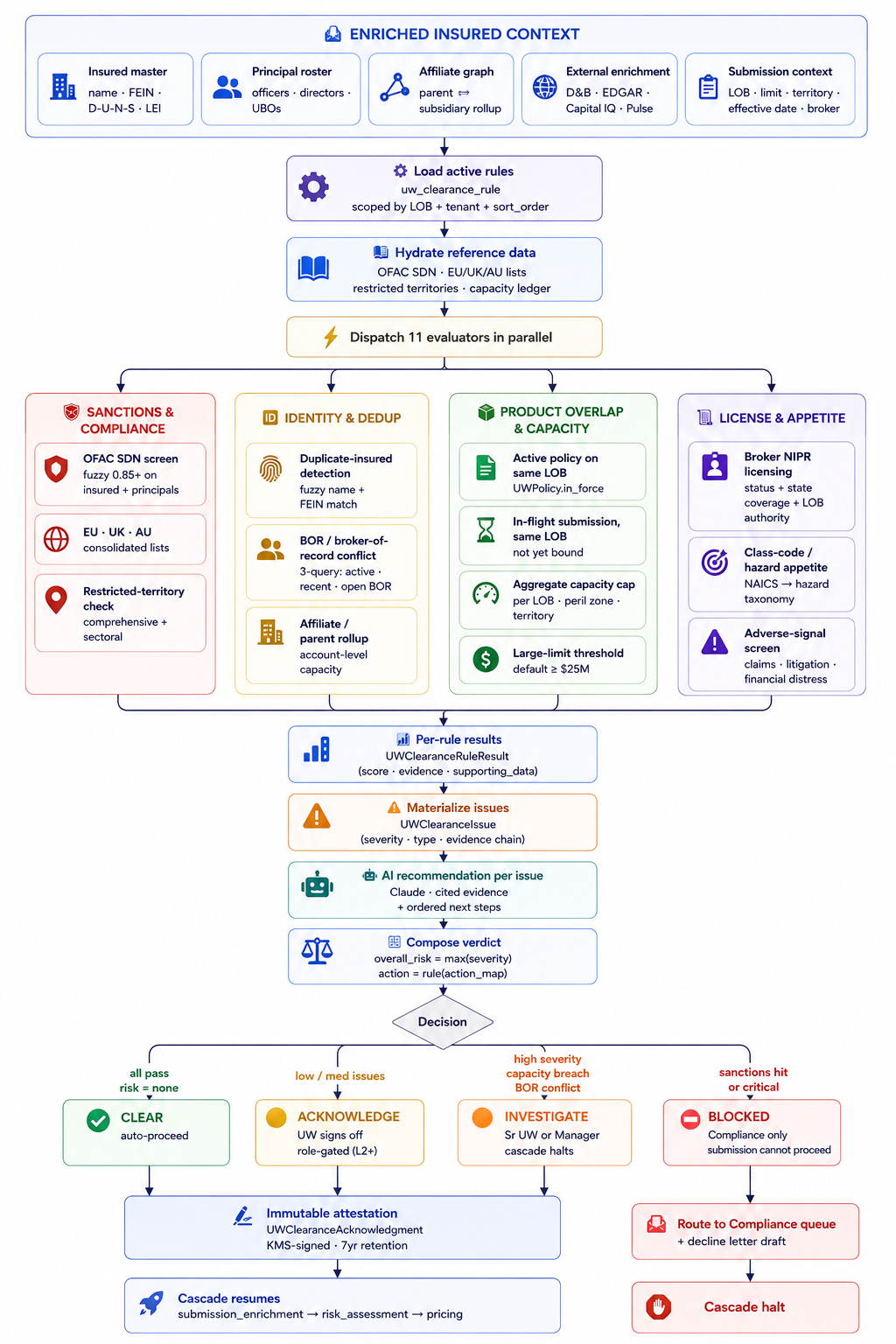
The architecture in one picture
The Corporate Clearance Agent runs as a four-band pipeline. Enriched insured context at the top is what the agent reads — it never re-fetches from external systems; the upstream Submission Enrichment Agent has already hydrated D&B, EDGAR, Capital IQ, and Pulse. Eleven evaluators fire in parallel across four rule families. AI produces a per-issue recommendation with cited evidence. The decision at the bottom picks one of four paths — and every path, including auto-CLEAR, writes a KMS-signed attestation row for the audit trail.
Click the image to open at full resolution.
Reading the four bands
| Band | What lives there | Why it's there |
|---|---|---|
| Inputs | Insured master, principal roster, affiliate graph, external enrichment, submission context | The agent reads — it doesn't fetch. Hydration happens upstream so clearance can be deterministic and fast. |
| Pre-compute | Load active rules (scoped by LOB + tenant), hydrate OFAC / EU / UK / AU lists, restricted territories, capacity ledger | Reference data is loaded once per run and reused across the 11 evaluators. |
| Parallel evaluation | 11 evaluators across four families: Sanctions & Compliance, Identity & Dedup, Product Overlap & Capacity, License & Appetite | Parallel because they're independent. Per-rule writes go to UWClearanceRuleResult; failures become UWClearanceIssue rows with severity. |
| Verdict + attestation | AI recommends per-issue actions with cited evidence; agent composes overall risk and an action verdict; decision routes to CLEAR / ACKNOWLEDGE / INVESTIGATE / BLOCKED; signed attestation row written either way | The audit trail is the deliverable. Every decision is reconstructable from one signed row + the evidence it points to. |
The four verdicts in one paragraph each
CLEAR — all 11 rules pass with no issues. The agent writes the attestation automatically and the cascade resumes to Enrichment → Risk Assessment → Pricing. The UW never has to click. About 60–70% of submissions follow this path on most carrier books.
ACKNOWLEDGE — one or two low / medium severity issues need a UW's eyes (an out-of-appetite class code, a duplicate-insured suggestion, a large-limit threshold tripped). The cascade pauses; the workbench surfaces the gate as "Awaiting your action" with the specific reason. The UW reviews, accepts or edits, and signs off. The attestation captures who, when, and why.
INVESTIGATE — high-severity issues (capacity breach, BOR conflict, broker license expired in rating state, restricted-territory hit, adverse-signal severity). The cascade halts. The submission routes to a Sr UW or Manager with the full evidence package. Pricing doesn't run until INVESTIGATE clears.
BLOCKED — sanctions hit (OFAC SDN, EU/UK/AU list, restricted territory comprehensive list), or any critical-severity issue. Compliance owns the next step. A decline letter draft is prepared. The cascade is terminal — bind cannot happen without an explicit compliance officer override with CUO sign-off.
Six P&C scenarios
Each scenario below is constructed to exercise a different decision path with a representative P&C line and a representative trigger. The "What the UW sees" line is the actual gate-state surfaced on the InsightUW Live Console.
Scenario 1 · Clean D&O submission for a mid-cap public company CLEAR · auto-proceed
UWClearanceAcknowledgment · action=CLEAR · attestor=clearance_agent_v3 · signature=KMS-signed · 7yr retentionScenario 2 · Property submission, $40M TIV warehouse, prior incumbent ACKNOWLEDGE · UW signs off
UWClearanceAcknowledgment · action=ACKNOWLEDGE · attestor=sarah_chen · role=senior_uw · justification stored · KMS-signed.Scenario 3 · Excess Casualty layer that breaches per-LOB capacity INVESTIGATE · cascade halts
UWClearanceAcknowledgment · action=INVESTIGATE → PROCEED-WITH-CESSION · attestor=david_park · role=manager · justification + cession reference stored.Scenario 4 · Marine cargo voyage that crosses a sectoral-sanctioned territory INVESTIGATE · cascade halts
UWClearanceAcknowledgment + linked UWSanctionsCheck evidence row (7-year retention). Endorsement reference linked to the subsequent quote.Scenario 5 · Cyber submission where an OFAC SDN hits on a principal BLOCKED · Compliance only
auto_declination agent with the OFAC reason code mapped to state DOI taxonomy.UWClearanceAcknowledgment · action=BLOCKED · linked UWSanctionsCheck evidence (immutable, 7-year retention). All cleared CUO overrides require a second signature.Scenario 6 · Workers Comp where the broker's license is expired in the rating state INVESTIGATE · cascade halts
auto_declination agent's mandate-check overrides the BLOCKED path. The cascade pauses for the license issue to resolve, but the submission stays open. The Compose-verdict step records this nuance in the attestation.UWClearanceAcknowledgment · action=INVESTIGATE · linked UWClearanceIssue for license + NIPR API response snapshot · attestation pending broker reinstatement.What the UW actually sees
The InsightUW Live Console doesn't show the UW a Proceed button on every rule. It groups gates into three buckets per submission, computed from the per-run state of every agent:
| Bucket | What it contains | UI treatment |
|---|---|---|
| Awaiting your action | Pending (clearance has issues that need a UW sign-off) or blocked (something failed) | Yellow / red, top of the panel, with the specific reason on the card. Buttons: Review & Proceed, or "Need {role}" if the active persona lacks authority. |
| Acknowledged | Gates where a human has already cleared, with KMS-signed attestation | Green, with who, role, timestamp, and the justification snippet inline. |
| Auto-cleared by the platform | Everything the agent passed cleanly — no human touch needed | Collapsed by default. Click to expand if you want to see "why didn't this fire." |
For Scenario 1 (clean D&O), the header shows "0 gates need you". For Scenario 3 (capacity breach), the header shows "1 gate needs you" in orange, the actionable card is on top with the reason, and the other 30+ agent gates collapse under Auto-cleared. The UW's eye goes to the one thing that needs them.
Why this matters for P&C
Manual clearance on a commercial P&C submission takes 1–3 days, lives in screenshots and email threads, and is unevenly applied — what one UW catches the next one misses. The Corporate Clearance Agent compresses this to 4–9 seconds wall-clock for the deterministic part, with the human touching only the submissions that genuinely need a decision.
| Outcome | Traditional clearance | InsightUW Clearance Agent |
|---|---|---|
| Sanctions screen consistency | UW-dependent; weekend list updates often missed | Always against the latest list (with staleness alarm); evidence row kept 7 years |
| Capacity breach detection | Requires UW to remember to check the dashboard | Computed automatically against the live ledger; INVESTIGATE halts cascade |
| BOR conflict catch rate | Often discovered post-bind during PAS upload | Three-query detection at intake; bilateral broker notification fired the same minute |
| Audit trail | Email threads, screenshots, PDFs | One UWClearanceAcknowledgment row with KMS signature + linked evidence rows |
| Time to "ready for UW desk" | 1–3 days | Seconds for the agent; minutes-to-hours for the human review on the small subset that needs it |
| Role discipline | UW signs off on everything; authority is a checkbox | Required role is enforced at attestation time — a UA cannot ack an INVESTIGATE |
Tunables a carrier owns
Nothing about the agent is hard-coded for a single carrier. Everything below is admin-tunable per tenant and per LOB:
- Fuzzy match threshold (default 0.85) — controls how aggressive duplicate / SDN matching is
- Sanctions cache TTL (default 24h) — beyond this, staleness alarm fires and results are marked
degraded=true - Aggregate capacity cap per LOB / peril / territory — driven by capital allocation, not engineering
- Large-limit threshold (default $25M) — triggers ACKNOWLEDGE even if all rules pass
- Active-policy lookback (default 365 days) — renewals beyond this don't BOR-conflict
- Recent-submission lookback (default 90 days) — window for cross-broker submission flagging
- BOR overdue + reminder cadence (default 5 / 2 days) — escalation timing
- Per-rule severity override and failure_action — re-grade any rule per tenant without touching code
- LOB scope on every rule — limit a rule to specific LOBs or leave empty for all
Role hierarchy is six levels (L0 anonymous · L1 UA · L2 UW · L3 Sr UW · L4 Manager / VP · L5 Compliance). Each rule's failure_action declares the minimum role required to clear an issue at that severity.
What's Next
This post covered the Corporate Clearance Agent end-to-end. Subsequent posts will go deeper on:
- The Auto-Declination Agent — how the state-DOI taxonomy mapping, mandatory-issue overrides, and broker appeals workflow combine to produce regulator-defensible declines
- The Aggregate Capacity Ledger — how InsightUW maintains a live, queryable view of bound + in-flight exposure across LOB / peril / territory, and how reinsurance cessions net out in real time
- Per-run authority gates — how the workbench computes per-submission gate state (pending / blocked / cleared / auto-cleared) and surfaces only what needs the UW
Want to see the Corporate Clearance Agent run a real broker email end-to-end — including a BLOCKED sanctions hit and an INVESTIGATE capacity breach — in a 45-minute working session against your LOBs? Request a demo.