Commercial underwriting is mostly assembly. A broker sends an email with an application, loss runs and a schedule; someone files it, checks sanctions and conflicts, looks up the account, applies the guidelines and builds a price. Only then does the underwriter judge the risk. InsightUW is a workstation for P&C carriers and MGAs in which agents do the assembly and record what they found, and underwriters make the calls.
In short
- Every submission moves through six stages, from received to bound, shown at the top of its page.
- Analyze runs eight steps (extract, clear, appetite, enrich, brief, price, decide, gate) and records what each found.
- Checkpoints stop the flow where a person must decide, and the agents leave a prepared decision: what they recommend, why, and the one question.
- Autonomy is set per agent, line and action, from L1 (draft only) to L4 (act), under a ceiling the carrier sets. Declines always wait for a person, and binds do by default.
A submission's life
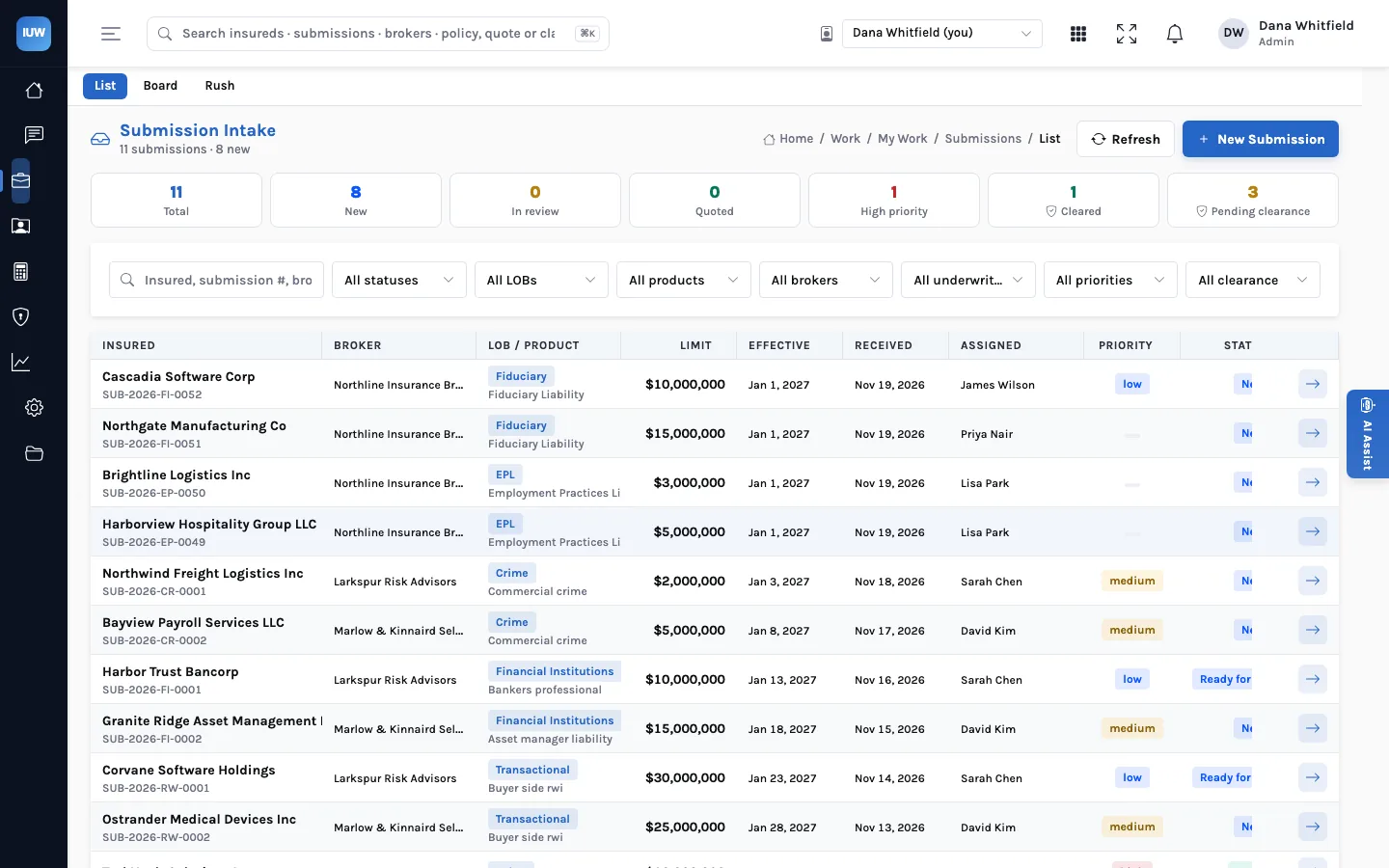
A new submission lands in Submission Intake, from a mailbox, an upload or the API. The list shows the insured, broker, line and product, limit, effective date, assignee, priority and clearance status, and can be switched to a pipeline board or a rush view.
The submission page
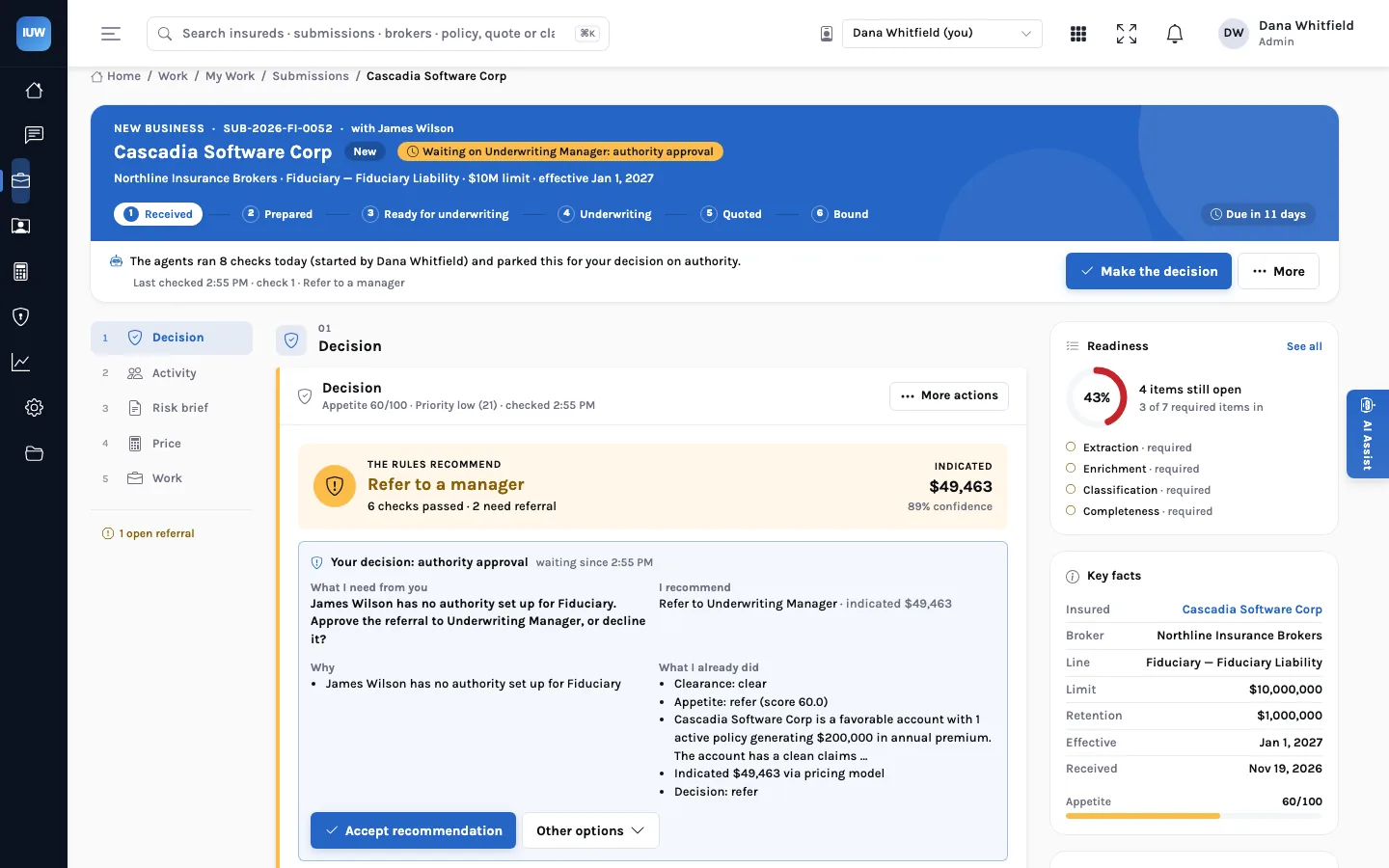
Open a submission and the page is laid out in five zones: Decision, Activity, Risk brief, Price and Work. The header carries the stage, the line, the limit, the effective date and a due date. A banner says what the agents last did. A rail on the right shows readiness (extraction, enrichment, classification, completeness), the key facts, and counts of documents, tasks, notes, emails, referrals and subjectivities.
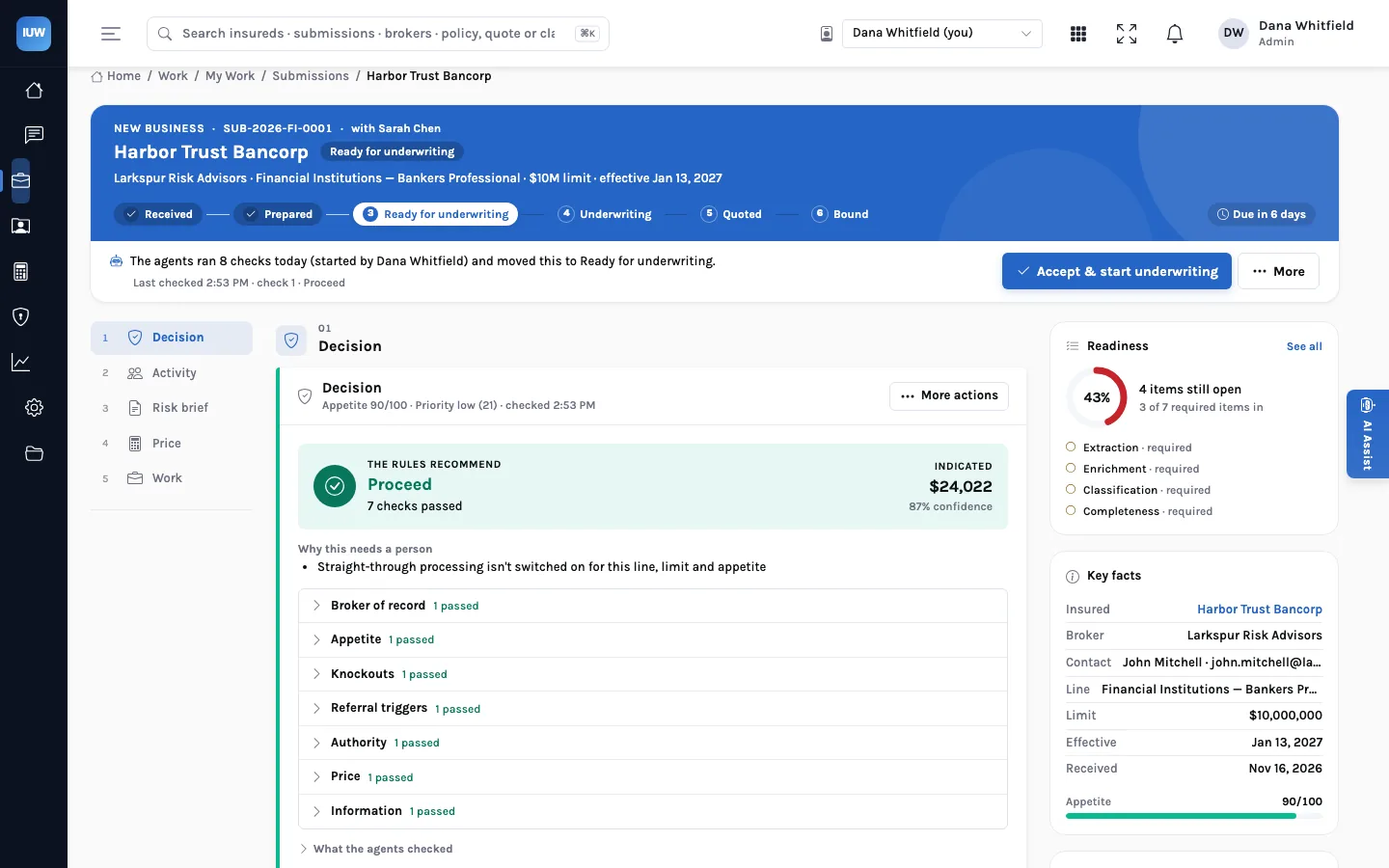
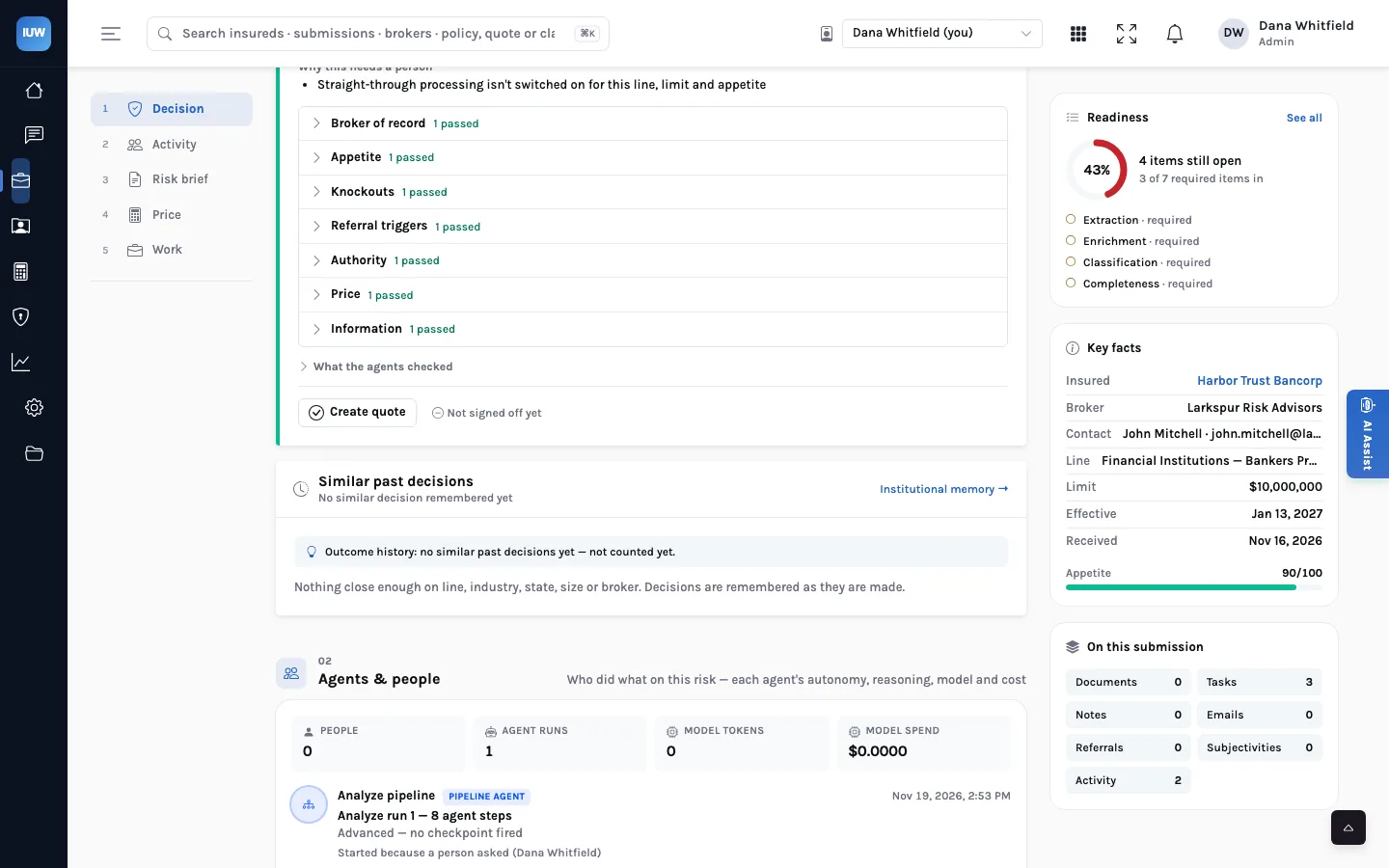
The Decision zone states the recommendation (proceed, refer or decline), the indicated premium and its confidence, and why a person is needed. Under it, each group of checks (broker of record, appetite, knockouts, referral triggers, authority, price, information) can be expanded to see what passed and what fired. Below that are similar past decisions from the institutional memory, and the agents and people who worked on the risk.
Who uses it
| Role | Where they spend time | What InsightUW gives them |
|---|---|---|
| Underwriter | Home, My Work, the submission page | A prepared file and a recommendation with the checks behind it |
| Underwriting manager | Referrals, authority, autonomy | Prepared decisions for referrals; who may quote what; how much the agents may do |
| Operations / intake | Submission Intake, the pipeline board, agent activity | Where every submission is and what is waiting on whom |
| Compliance | Queues & Compliance, audit | Declines, overrides and every agent step recorded |
| Admin | Rules Studio, reference data, workflow | Appetite, referral and checkpoint rules changed without a release |
Home: what needs me
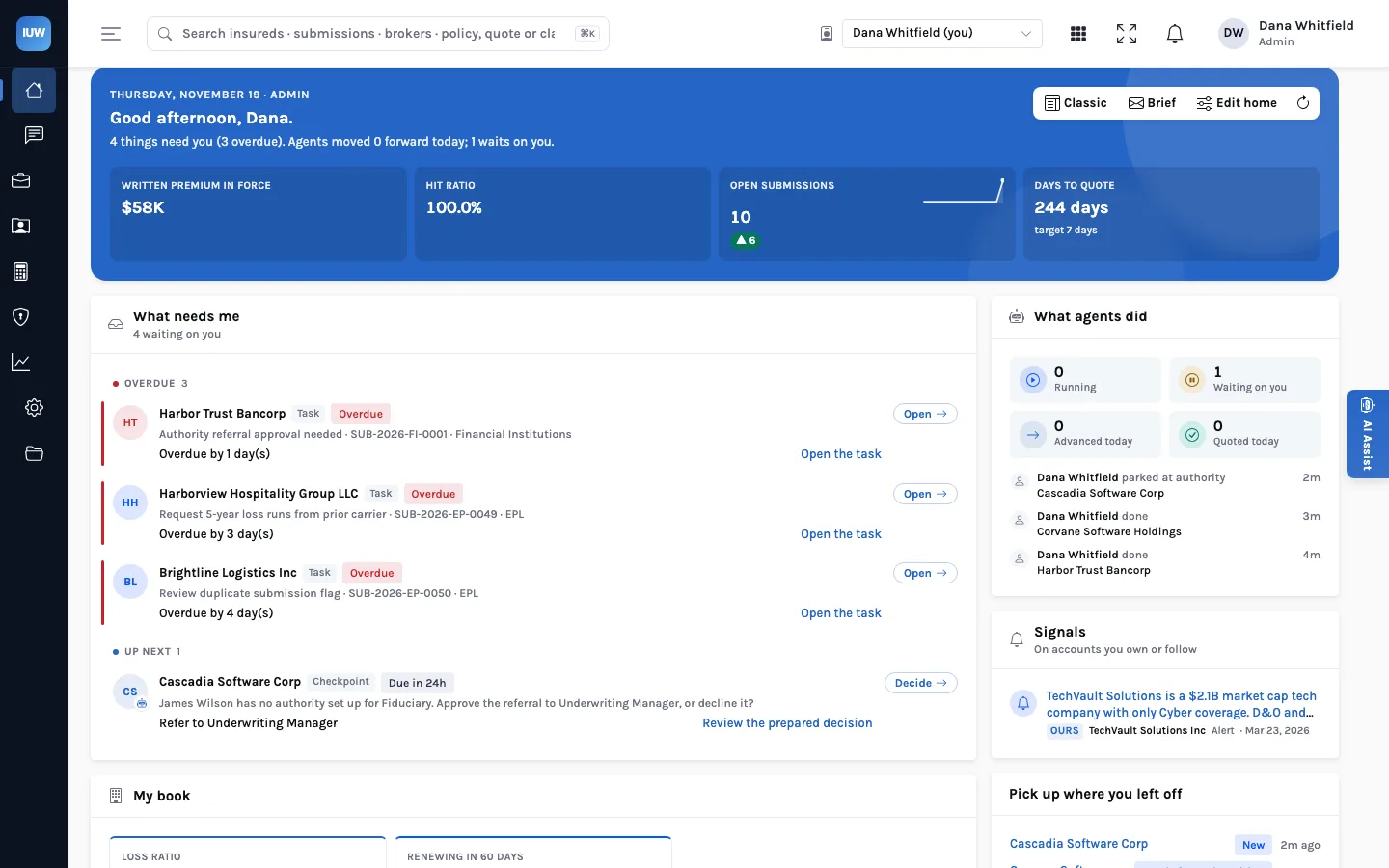
Home opens with the person's numbers (premium in force, hit ratio, open submissions, days to quote), then What needs me: overdue tasks and decisions the agents parked for this person. Beside it, What agents did summarises agent runs on the person's book, and Signals shows news and alerts on accounts they own or follow.
A Tuesday at Harborline Specialty
Harborline Specialty (fictional) writes management liability through a panel of brokers. Overnight, three new submissions arrived. Analyze ran on each. Two cleared every check and moved to Ready for underwriting, each with an indicated premium. The third, a fiduciary risk, needs authority the assigned underwriter does not hold, so it was parked with a prepared referral for the underwriting manager.
The underwriter starts with the two ready files; the manager answers the referral from his Home page in one click, or changes it. Nobody re-keyed the application.
What it is not
InsightUW does not take the underwriting decision away from underwriters. A decline is always confirmed by a person; a bind waits for a person unless the carrier changes that checkpoint; straight-through quoting is off by default and switched on per line by the carrier. Where a language model is used, for example to read documents or draft a broker email, it runs behind the steps; the rules, checkpoints and authority are explicit and recorded. The next articles go through the Analyze pipeline, checkpoints and autonomy levels in detail.
How the pieces fit together
Five mechanisms do most of the work, and each has a clear owner:
| Mechanism | What it decides | Who sets it |
|---|---|---|
| Analyze pipeline | What the agents prepare: extraction, clearance, appetite, enrichment, the brief, the price, the decision record | Fixed sequence; runs on arrival or on demand |
| Rules Studio | Appetite, knockouts, referral triggers, checkpoints, routing and other rule types | Admins and underwriting operations, as drafts that are tested and then published |
| Checkpoints | Where the pipeline stops and hands a prepared decision to a person | Managers: scope by line, thresholds, on or off |
| Authority | Who may quote which line, up to what limit, premium and loss ratio | Managers request; someone else approves |
| Autonomy levels | How much each agent may do for each action on each line | Managers, under a carrier-wide ceiling |
When something isn't configured
InsightUW says so rather than filling the gap. If a line has no pricing model or desk-rate table, the price step reports that no rater is configured and the Price zone stays empty; it does not invent a premium. If no enrichment providers are set up, the enrich step records that and the run carries on. If no language model is configured, the brief step writes its summary from the account's own records without one, and the guideline import in Rules Studio proposes nothing.
What to set up first
- 1Appetite and knockout rulesunderwriting ops
Start with the sentences in your guidelines that are easiest to state exactly; see the guide.
- 2Authority grantsmanager
One grant per underwriter and line, with limit, premium and any loss ratio ceiling. Each is approved by someone other than the requester.
- 3A rater per linepricing / actuarial
A published pricing model or a desk-rate table. Without one, the price checkpoint has nothing to compare.
- 4Checkpoint thresholdshead of underwriting
Review the defaults (for example a price tolerance of 15% against expiring) and scope any changes to a line.
- 5Leave the ceiling at L2head of underwriting
Watch agreement for a few months before letting any agent act on its own.
Is it a fit? A short checklist
- Your underwriters spend real time assembling files before they can judge them: re-keying applications, chasing loss runs, checking clearance by hand.
- Your guidelines and authority exist on paper and you want them applied the same way to every submission, with a record of when they fired.
- You want automation you can turn up slowly, line by line and action by action, rather than all at once.
Questions buyers ask
Does it need a language model to work?
No. The pipeline, rules, checkpoints, authority and pricing run without one; the screenshots in these articles come from runs that used no model at all. A model, where configured, helps with reading documents, writing the brief's narrative, drafting broker emails and proposing rules from a guidelines manual, and its tokens and spend are shown per submission.
Can an agent bind or decline on its own?
A decline always waits for a person. Bind is a checkpoint that asks a person by default; a carrier would have to change that rule, and the agent's level and the ceiling would still apply.
What happens if a rule is wrong?
Rules are versioned. A published rule can be rolled back to an earlier version or retired, and every change is audited. Underwriters changing a recommendation repeatedly is usually the first sign, and it shows in the agent's agreement rate.
Screens show a local InsightUW workspace with made-up insureds, brokers and underwriters. Nothing here is a statement about any real company's risk.